Automate
Turn events into actions.
A chat message, a new follower, a file that changed — pick what fires it, filter it the way you want, and Fluxta runs the actions on your PC with nobody pressing anything.
 FluxtaDownload
Automate events, build your own controls, and extend everything with plugins.
One system
Automation, control, and extensibility are not three tools bolted together — they are the same system seen from three sides.
Turn events into actions.
A chat message, a new follower, a file that changed — pick what fires it, filter it the way you want, and Fluxta runs the actions on your PC with nobody pressing anything.
Build the deck you actually want.
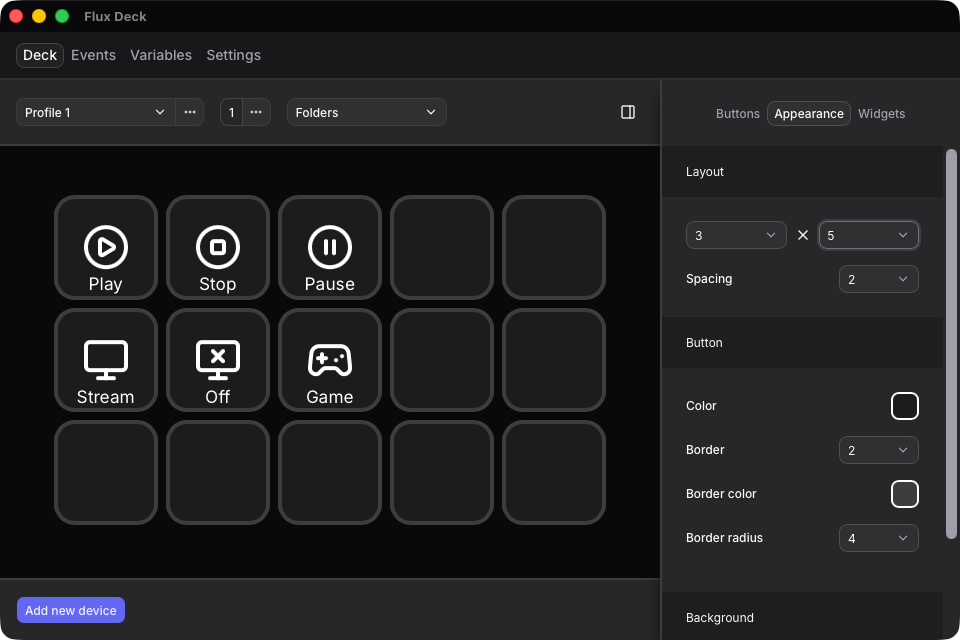
Any phone, tablet, or spare screen on your network becomes a deck. Bind a button to one action or a whole sequence, give it states, and group buttons into boards you switch between per game, scene, or project.
Add what isn't there yet.
Integrations, actions, and events all arrive the same way: as plugins. The SDK behind them is public, so anything missing is something you can write in JavaScript.
How it works
The same actions run whether something fired them or you pressed them. Three steps is the whole setup.
It runs in the background and opens a connection on your local network for a deck to connect to.
Connect from your phone, tablet, or any browser on the same network. Add buttons, pick icons, and choose what each one does — or set up an Event for the things that should happen on their own.
Either way, Fluxta runs the same actions on your PC right away — no extra window to keep open.
Open by design
Fluxta has no privileged insiders. The integrations it ships with are written against the same public SDK you would use — so the app has no feature ceiling that only we can raise.
You’re not limited to what we decide to build.
Plugin library
Every published plugin installs from the Marketplace inside the app. The library is young and open on purpose — anything missing from it is something anyone can publish.
Control OBS Studio
Streaming platform integration
Test
For developers
A plugin is a folder with a manifest and a Node script. If you know JavaScript, you already know how to extend Fluxta — and what you add shows up in the app exactly like everything else does.
Ready when you are
Automate what repeats, keep the rest one press away, and build anything that is still missing.
Download